
Free · v1.0.0 · 4.4 MB
Auto Clicker for Windows
A small, free auto clicker for Windows 10 and Windows 11. Install it or run the portable .exe, set your click speed and press F6.
Download for Windows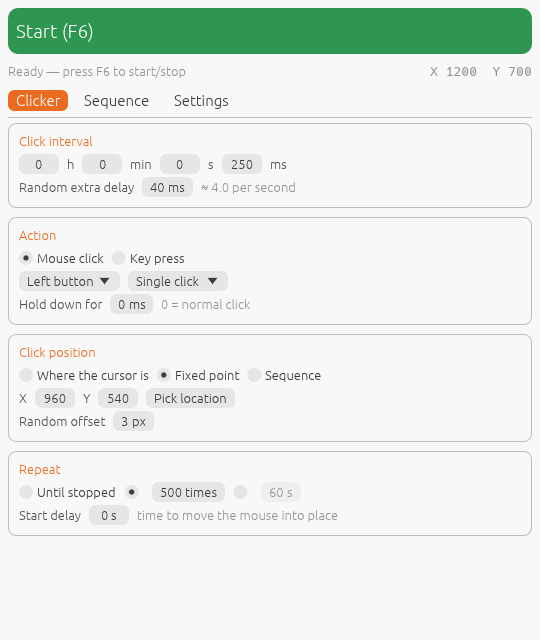
Install on Windows
- Download AutoClicker-Setup-1.0.0.exe (or the portable .exe if you would rather not install anything).
- Open the file. Because the app is new and unsigned, SmartScreen may show “Windows protected your PC”. Click More info, then Run anyway. This happens only once.
- Follow the installer. It installs for your user only, so it does not need administrator rights, and adds Auto Clicker to the Start menu.
- Set the interval and click type, then press F6 to start and stop.
What it can do
Any speed
Set the gap between clicks in hours, minutes, seconds and milliseconds, from one click a day to 1,000 a second. Add a random extra delay so clicks are not perfectly even.
Every kind of click
Left, right or middle button. Single, double or triple clicks. Hold the button down for as long as you need for drag-style or charge-up clicks.
Click where you want
Click under the cursor, at one fixed point you pick on screen, or at a list of points one after another, with an optional random offset of a few pixels.
Record and replay
Press F8, click around the screen, press F8 again. Your clicks, buttons and the pauses between them become a sequence that loops.
Auto key presser
Switch to key mode to press Space, Enter, arrows, letters, numbers or F-keys on a timer, with the same hold, repeat and hotkey options.
Stop when you want
Run until you stop it, a set number of times, or for a set number of seconds. A start delay gives you time to get the mouse into place.
Global hotkeys
F6 starts and stops from any app, F8 records. Change them to any F-key or Insert/Home/End/Page keys, with Ctrl, Shift or Alt.
Fail-safe
Throw the mouse into the top-left corner of the screen and clicking stops at once. It never clicks its own window, so the Stop button always works.
Profiles
Save a setup under a name and load it later. Your last settings are kept automatically between runs.